Download this practical Monthly & Annual Budget Planner Excel Template to track income, expenses, category budgets, and annual totals in one organized workbook. This free template is designed for users who want a clean and easy-to-use budgeting spreadsheet in Excel 365.
Instead of using multiple files or a complicated budgeting app, you can manage your financial activity in one workbook with a simple structure. It is fully editable, beginner-friendly, and useful for personal budgeting, family expenses, and general monthly planning.
What This Free Budget Planner Excel Template Helps You Do
This workbook is designed to make budgeting easier without overcomplicating the process. You can define categories, record transactions, compare planned amounts with actual spending, and review annual results in a structured way.
- Track monthly income and expenses
- Set category-based budget targets
- Compare planned vs actual spending
- Review yearly totals in one place
- Customize the workbook for your own needs
- Keep your budgeting process simple and organized
If you like using spreadsheets for personal finance, this template also works well with Excel functions such as SUM and SUMIF, which are commonly used in budgeting and reporting workflows.
Sheets Included in the Free Workbook
1. Setup
2. Transactions
3. Budget Sheet
4. Annual Summary
Each sheet has a specific purpose. Together, they create a simple budgeting flow: define your structure, enter transactions, review your budget, and understand yearly totals.
Setup Sheet
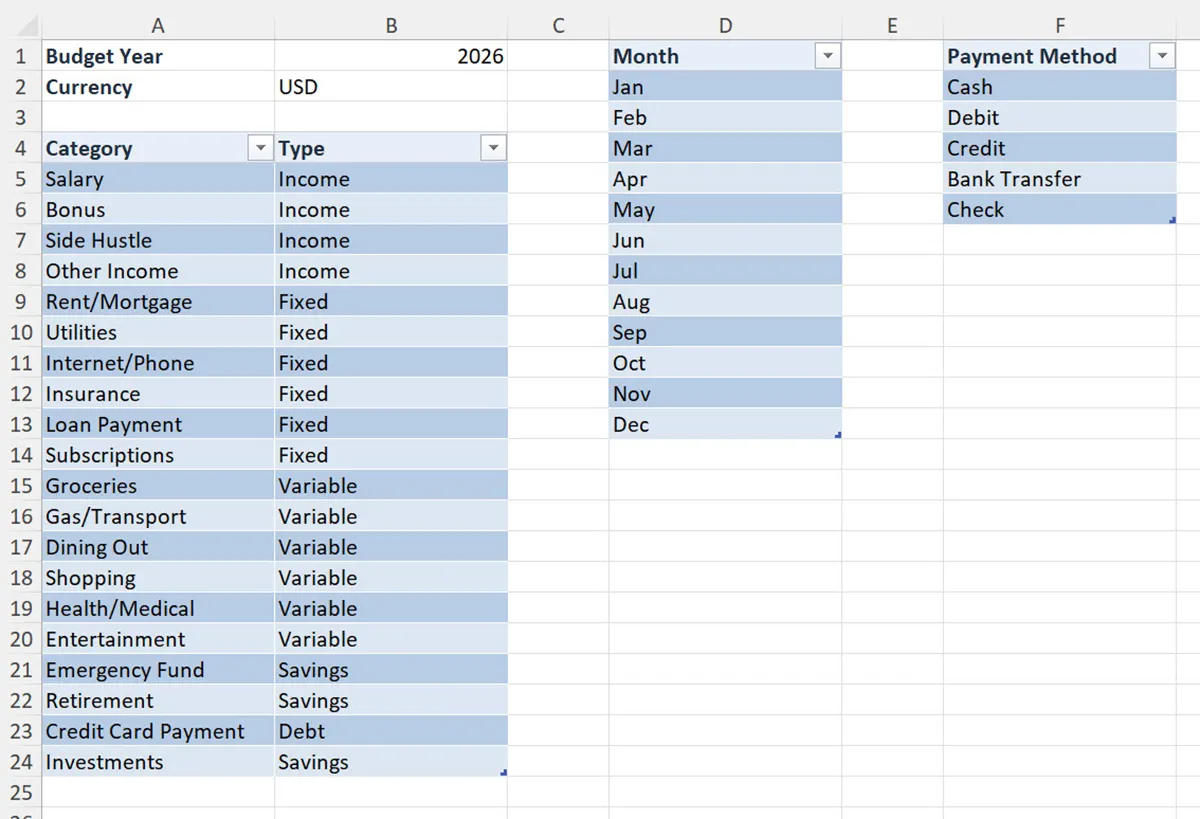
The Setup sheet acts as the workbook’s foundation. It contains the supporting lists used across the template, including months, categories, and payment methods. These values help keep the workbook organized and make data entry more consistent.
A well-structured setup sheet reduces mistakes and makes summaries more reliable. Instead of typing categories differently every time, you can work with a cleaner list structure that supports more accurate tracking.
This sheet is useful for:
- Editing expense and income categories
- Maintaining a clear monthly structure
- Supporting cleaner data entry
- Customizing the workbook for personal or household use
If you want to create similar spreadsheet workflows, this guide on how to create dropdown lists in Excel is a helpful next step.
Transactions Sheet
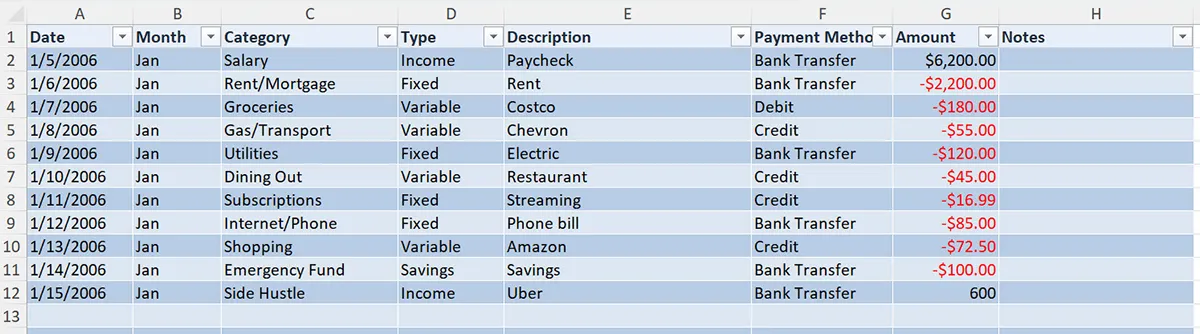
The Transactions sheet is the main data-entry area of the workbook. Every income and expense row should be recorded here so the rest of the workbook can summarize the information correctly.
This sheet is important because your budget calculations and annual totals depend on the data entered here. A clean transaction log makes the workbook more useful and easier to review over time.
Use this sheet to:
- Record daily and monthly spending
- Track income sources
- Assign categories to transactions
- Build a reliable source for summary calculations
This structure works especially well with formulas that total values by category or date range. If you want to improve how you filter and analyze records later, the FILTER function in Excel and Google Sheets is also worth reviewing.
Budget Sheet
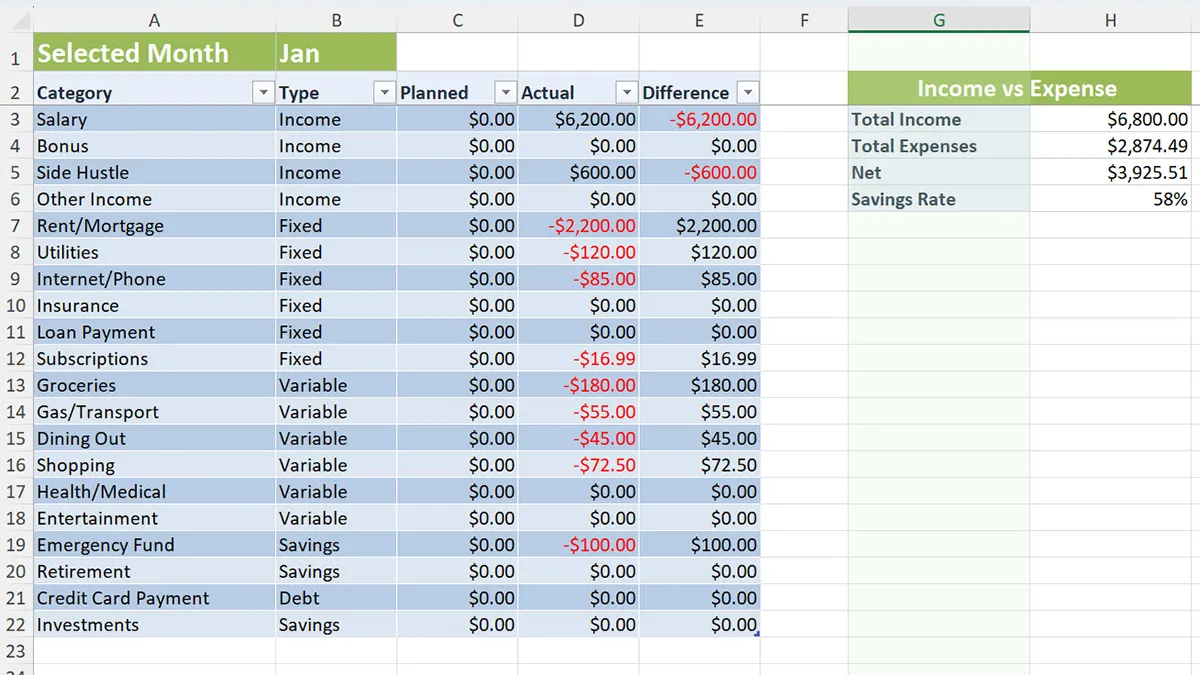
The Budget Sheet helps you compare your planned budget with your actual financial activity. This is where the workbook becomes especially useful because it turns raw transaction data into meaningful budgeting insight.
Reviewing planned vs actual values can help you quickly identify categories where you may be overspending or staying under budget.
A simple budgeting formula often follows this logic:
=Planned - ActualCategory totals may also rely on formulas such as:
=SUMIF(Transactions!C:C,"Food",Transactions!F:F)This kind of formula helps the workbook update totals automatically as more transaction rows are added. If you want to build more advanced reports in Excel later, you can also explore Pivot Tables in Excel.
This sheet is useful for:
- Reviewing budget targets
- Comparing planned vs actual values
- Identifying overspending quickly
- Improving monthly budgeting decisions
Annual Summary Sheet
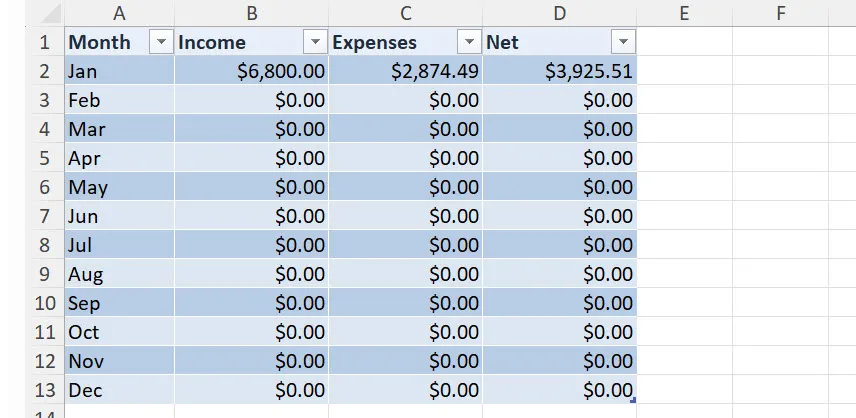
The Annual Summary sheet brings monthly results together into a single yearly view. This makes it easier to understand the bigger picture instead of reviewing one month at a time.
With enough transaction data entered, this sheet helps you review total income, total expenses, and net results across the year in a more organized way.
This sheet helps you review:
- Monthly totals across the year
- Overall income and expense patterns
- Annual net results
- Budget performance over time
If you later want to explore planning or projections in spreadsheets, this guide to the FORECAST function can help you learn more.
How the Template Works
- Review and adjust the supporting lists in the Setup sheet.
- Enter your income and expense records in the Transactions sheet.
- Use the Budget Sheet to compare actual values against your planned amounts.
- Check the Annual Summary to understand your yearly financial picture.
The workflow is simple: set up the workbook, record transactions, review your budget, and track yearly totals.
Who Should Use This Free Template
- People creating a personal monthly budget
- Households tracking regular expenses
- Excel beginners who want a practical finance workbook
- Users who prefer editable spreadsheets over budgeting apps
- Anyone looking for a simple free budget planner Excel template
If you are newer to Excel, Microsoft’s official Excel support resources can also be helpful for broader spreadsheet guidance.
Why Use This Free Budget Planner Excel Template
Many people do not need a complex finance tool to start budgeting better. What matters most is having a workbook that is clear, editable, and structured well enough to support better decisions.
This free version focuses on the core budgeting workflow. That makes it easier to download, easier to understand, and easier to customize for everyday use.