
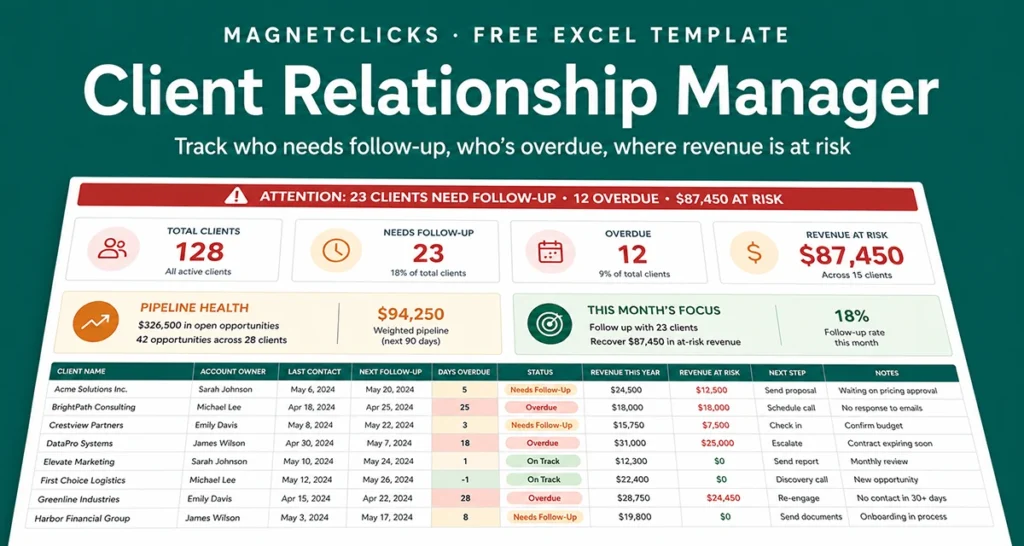
Client Relationship Manager Template for Excel
This client relationship manager template for Excel is designed for users who need a cleaner system than scattered notes, old email threads, and disconnected contact lists. Instead of treating client data as a simple address book, the template turns it into a working operations layer. You can store the contact name, company, lifecycle stage, account owner, last interaction, next follow-up date, value estimate, and status in one controlled workbook. That means fewer missed callbacks, faster handoffs, and more reliable visibility when you review active accounts.
The practical value of a client relationship manager template is not just storage. It is structure. When every record follows the same logic, you can filter high-priority accounts, sort by next action, and quickly spot inactive relationships before they become lost opportunities. This is especially useful for small teams, consultants, agencies, and business owners who are not ready for a paid CRM but still need disciplined client tracking.
The free version focuses on speed, clarity, and low-friction adoption. Open the file, add your records, tag the client stage, and start managing follow-ups from a single source. If your current process relies too heavily on memory, inbox searching, or manual check-ins, this template gives you a more intelligent starting point with a workflow that feels precise, scalable, and AI-ready. Another advantage is handoff quality. If more than one person touches client communication, a standardized workbook reduces dependency on memory and makes account context easier to transfer. Even in a solo workflow, the template creates a cleaner audit trail for what happened, what matters now, and what should happen next.
1 / 4
What you'll learn
-
✓
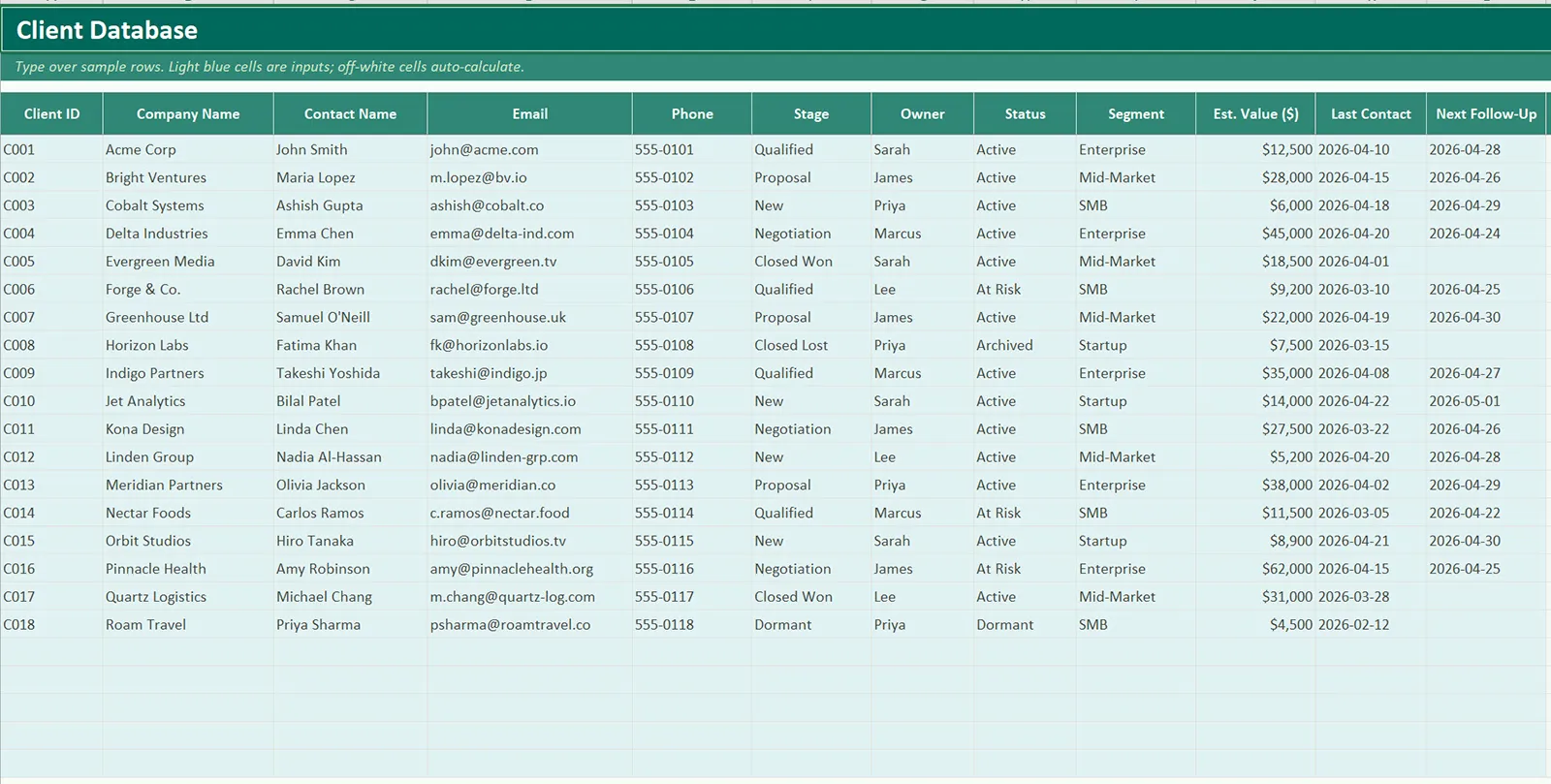
Create a reliable client database — Learn how to organize names, companies, phone numbers, email addresses, lifecycle stages, and internal notes in a format that stays easy to filter and review.
-
✓
Track account activity with context — See how a simple record structure can capture the last interaction, next action date, owner, and current status so each relationship has momentum.
-
✓
Use Excel like a lightweight CRM — Understand how filters, status fields, and lookup logic can help Excel behave like an early-stage relationship management system.
-
✓
Spot neglected or overdue accounts — Use date-based review habits to identify accounts that have not been contacted recently or require immediate follow-up.
-
✓
Prepare for future upgrades — Build data discipline now so it becomes easier to move into a Pro workbook, automation layer, or dedicated CRM platform later.
What's inside this workbook
1
Start Here
A welcome tab with quick orientation — what each tab does, what auto-updates, and where to type your own data over the sample.
2
Client Database
The main sheet stores one row per account or contact with core details, stage, assigned owner, value estimate, and relationship status.
3
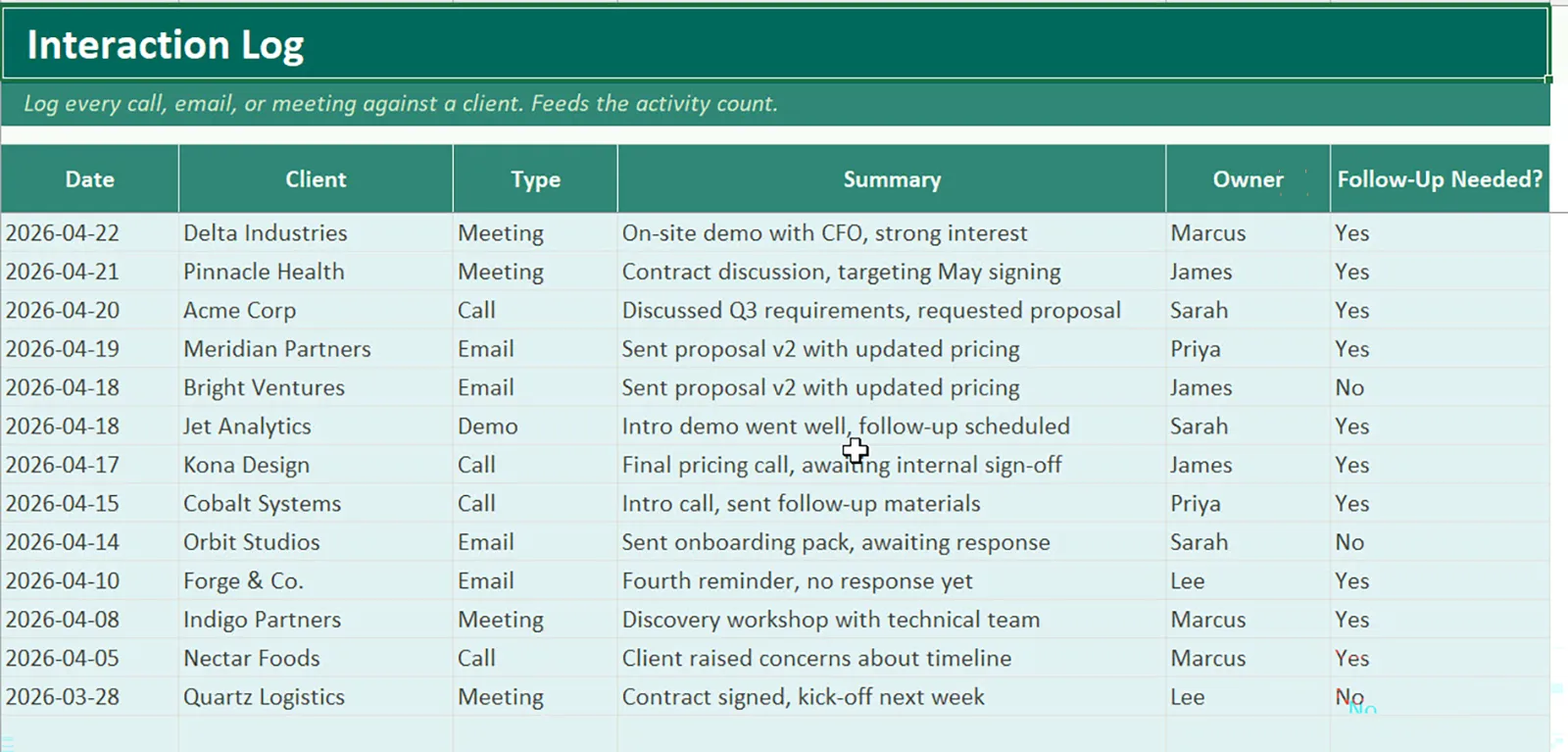
Interaction Log
A supporting tab records calls, emails, meetings, notes, and follow-up actions so the account history remains visible over time.
4
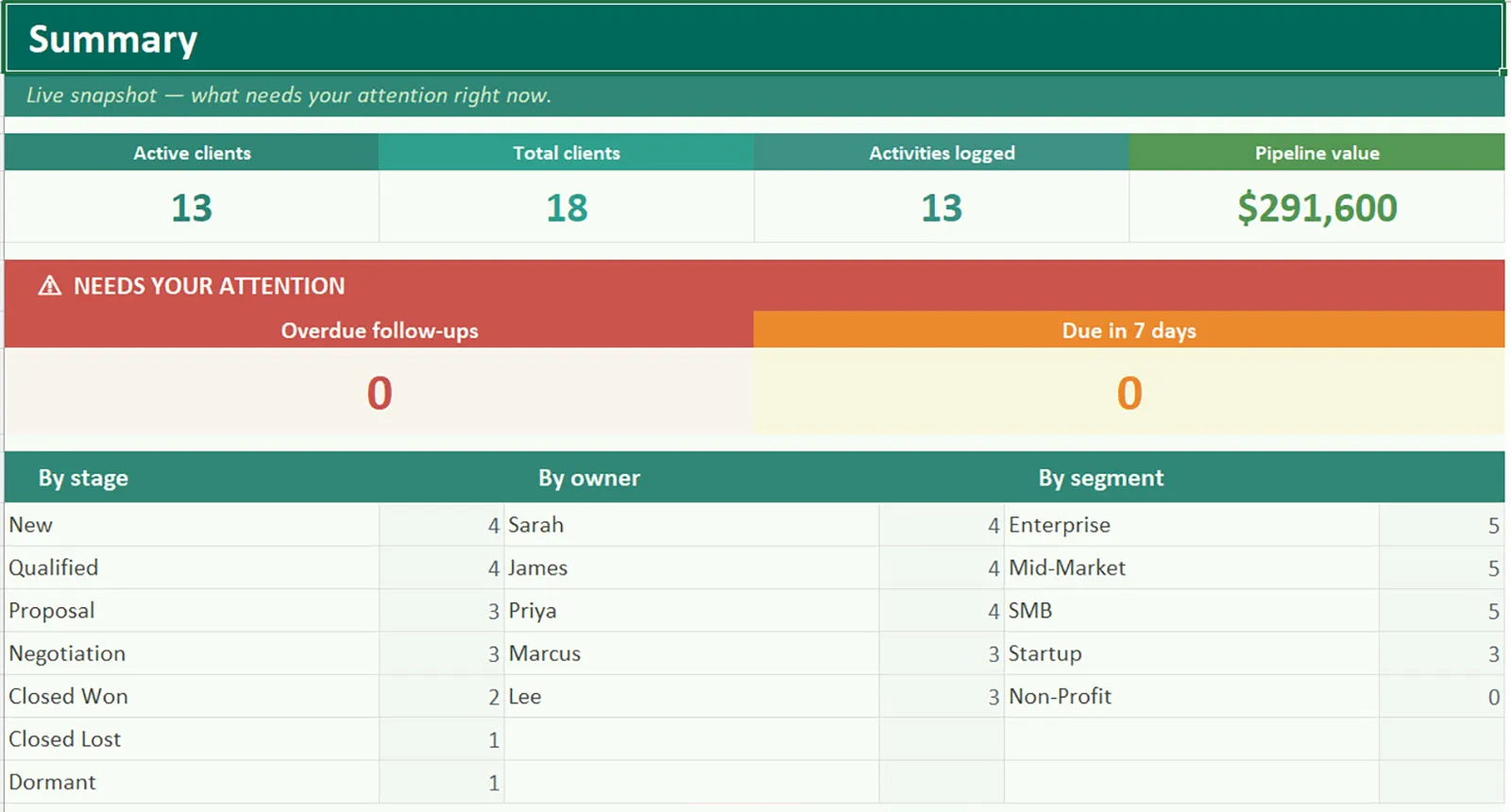
Summary
A live snapshot showing total clients, overdue follow-ups, due-soon counts, and breakdowns by stage, owner, and segment for daily review.
5
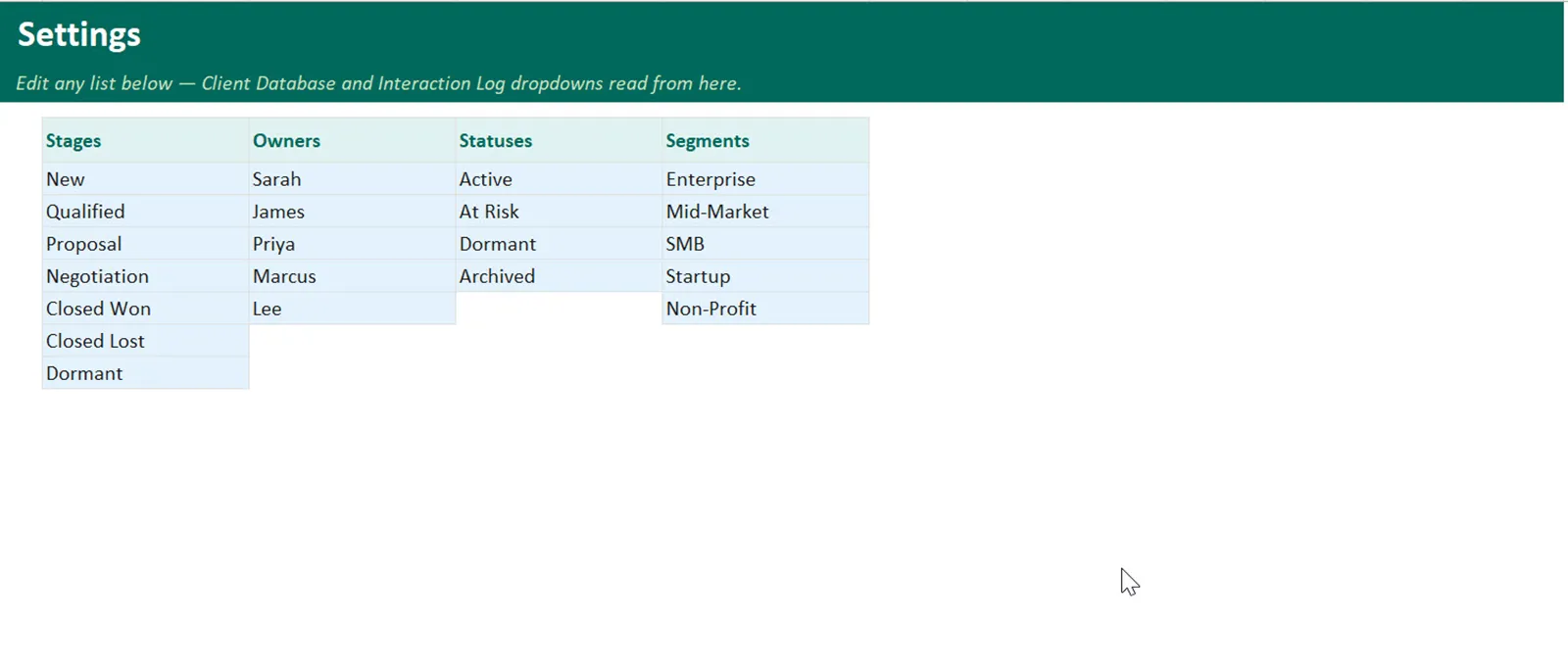
Settings
Dropdown values for stage, owner, status, and segment keep the workbook consistent and easier to maintain.
How to use this template
-
1Add every active client recordStart by entering one clean row per client or account. Include the key contact, company name, communication channel, and a simple stage label.
-
2Standardize your status valuesKeep stage names consistent across the workbook so filtering works properly. Avoid mixing custom wording for the same concept.
-
3Update the last interaction after each touchpointEvery meaningful call, email, or meeting should refresh the last-contact data so the workbook reflects current reality instead of stale memory.
-
4Assign a next action dateUse the next follow-up field as the control point for execution. This is what turns the workbook from passive storage into an active workflow tool.
-
5Review the follow-up sheet daily or weeklyMake the follow-up view part of your operating rhythm so overdue relationships surface before they turn into silent churn or missed revenue.
-
6Archive closed or inactive accounts carefullyDo not delete historical data. Move inactive records into a closed or dormant status so reporting stays accurate and the account history remains searchable.
How the formulas work
The free workbook usually relies on simple, high-value formulas rather than complicated spreadsheet engineering. IF logic can label records as Active, Waiting, Overdue, or Closed based on the fields you update most often. Date comparisons can highlight accounts that have gone quiet. Lookup formulas can pull client details into summary areas or review tabs without forcing duplicate entry. COUNTIF or COUNTIFS logic can show how many accounts sit in each lifecycle stage.
That formula stack matters because it keeps the workbook understandable. The goal is not to impress with complexity. The goal is to reduce friction, make the status of each relationship obvious, and let you act faster with less manual scanning. In more mature versions of the workbook, those formulas can also power simple dashboard cards, upcoming follow-up lists, and stage summaries. Starting with a readable formula layer now makes those later upgrades much easier.
Who this is for
-
✓
Freelancers and consultants — Ideal for solo operators who need client structure before investing in expensive sales software.
-
✓
Small sales teams — Useful for teams that want shared discipline around account tracking, follow-up timing, and activity review.
-
✓
Agencies and service businesses — Works well when multiple clients, decision-makers, and project conversations need to stay organized in one place.
-
✓
Operations-minded founders — A strong fit for business owners who prefer systems, visibility, and process control even in early-stage sales workflows.
Free Template
Download Client Relationship Manager Template for Excel free template
Want more?
Free vs Pro — what's different
| Feature | Free | Pro · $6.99 |
|---|---|---|
| Client database with searchable contacts | ✓ | ✓ |
| Follow-up tracking with status pills | ✓ | ✓ |
| Auto-calculating KPIs and breakdowns | ✓ | ✓ |
| Sample data to get started | ✓ | ✓ |
| Pipeline tab with weighted forecasting and deal-stage tracking | — | ✓ |
| Dashboard tab with live KPIs, bar chart, and pie chart | — | ✓ |
| Reports tab — printable monthly summary for leadership | — | ✓ |
| Source, Priority, Total Won, and Open Deals per client (auto-calculated) | — | ✓ |
| Lifetime free updates | — | ✓ |
| Email support | — | ✓ |
Ready to upgrade later? Get Pro any time.
View Pro version →
Need more fields, cleaner reporting, and stronger account visibility? See the Pro version for a more advanced CRM workflow. See the Pro version →
Frequently asked questions
It is a structured spreadsheet that stores contact records, account notes, next actions, and status fields in one place so you can manage client communication without buying a full CRM on day one.
Yes. The free version is intentionally lightweight, so consultants, agencies, sales reps, and small business owners can start using it quickly without setup overhead.
Yes. The template is designed to connect core contact information with interaction history, next follow-up dates, and a visible account status so nothing important gets lost.
Lookup formulas help surface client details, IF logic helps label record status, and date-based checks help flag overdue follow-ups or inactive accounts.
Yes. The Pro version is the logical upgrade when you want additional fields, stronger reporting, cleaner dashboards, and more automation-ready structure.
Related Templates